
Smart lighting control means managing your lights remotely, on a schedule, or automatically through sensors, rather than flicking a switch by hand. The payoff is real: lower energy bills, fewer wasted watts in empty rooms, and better security when you’re away from home. It runs on networked protocols such as Zigbee and the wired DALI-2 standard, and you can install it yourself with a few smart bulbs or bring in an electrician for a whole-house or commercial system wired into the fabric of the building.
The ENERGY STAR guidance on smart lighting confirms the core mechanism: systems cut unnecessary energy use by dimming or switching off lights when a space is unoccupied or when there’s enough daylight already in the room. That’s the whole game, really. Control is the feature you notice; energy saved when nobody’s looking is the feature that pays for itself.
Smarthometechnical writes this as electrical contractors who install both DIY-friendly and fully commissioned systems across homes and workplaces.
- Control: dim, schedule, and group lights from an app or voice assistant
- Savings: occupancy and daylight sensing cut wasted lighting energy automatically
- Safety: scheduled or randomised lighting deters intruders when you’re out
- Two install paths: retrofit smart bulbs (DIY) or a wired, standards-based system (professional)
Quick fact: Occupancy sensors combined with personal controls have been shown to cut lighting energy use by around 32% in open-plan office pilots, a saving that carries across to well-zoned homes too.
TL;DR:
- Occupancy sensors combined with personal controls can reduce lighting energy use by approximately 32 percent, according to field studies.
- Wired DALI-2 systems offer higher reliability and longer lifespan for large or commercial installations compared to wireless mesh alternatives.
- Ensuring a neutral wire is available at switches is crucial, as most older UK properties lack this, causing many DIY smart switch installations to fail.
- Choosing between smart bulbs, retrofit fittings, or smart switches depends on existing fixtures, control needs, and whether you want to preserve traditional switch functionality.
- Prioritize sensors and daylight harvesting over app control for actual energy savings, as these features have proven improvements in reducing wasted lighting.
Table of Contents
- How does smart lighting control actually work?
- Which smart lighting devices suit your space?
- What features actually save energy and improve wellbeing?
- Do you need an electrician to install smart lighting?
- How do you choose a compatible system?
- What’s the step-by-step for a smooth installation?
- Who’s behind this guide on smart lighting control?
- Key Takeaways
- Why the “smart bulb versus nothing” debate misses the point
- Get smart lighting control installed properly, alongside your wider energy setup
- Sources
How does smart lighting control actually work?
Every smart lighting system has three jobs to do: talk to devices, sense conditions, and act on rules. How it does each of those depends on the protocol underneath, and the protocol you choose shapes everything from reliability to how much rewiring you’ll need.
Zigbee is the most common mesh protocol in consumer smart lighting. Bulbs and plugs relay messages to each other, so the network gets stronger as you add devices, and a single hub can typically manage dozens of endpoints without much fuss.
Thread works similarly to Zigbee but is built on internet protocol (IP) networking, which makes it easier for different manufacturers’ hubs to talk to the same devices. It’s newer and still filling out its ecosystem, but it solves a real headache: fewer proprietary bridges cluttering the network cupboard.
Bluetooth Mesh skips the need for a dedicated hub in many cases, letting your phone talk directly to nearby bulbs. It’s popular in smaller retrofit projects where a full smart home hub feels like overkill.
Wi-Fi bulbs connect straight to your router. Simple to set up, but every bulb eats a slice of your network’s bandwidth, and large installations can start to strain a domestic router not built for dozens of connected devices.
DALI-2, standardised under IEC 62386, is the wired backbone of most commercial lighting control. Instead of a mesh of radio signals, DALI-2 uses a dedicated control bus, addressing each luminaire individually over a cable run.
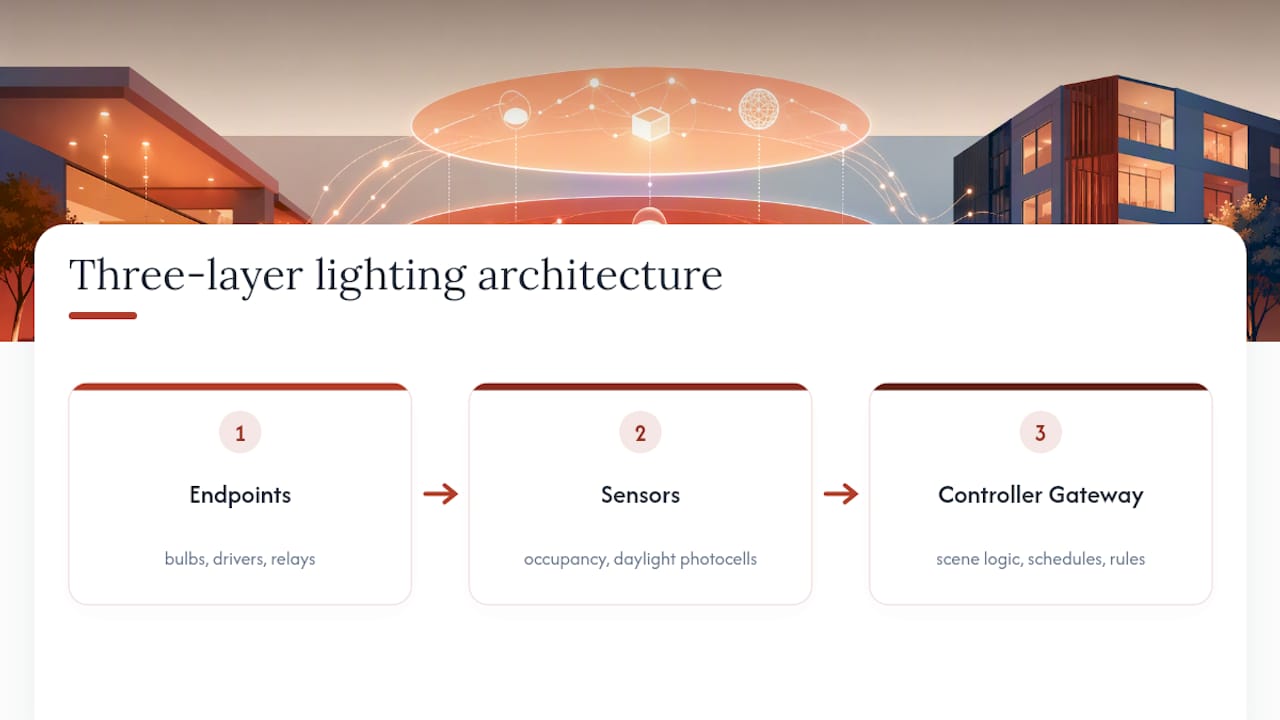
A typical system links three layers: endpoints (bulbs, LED drivers, relays), sensors (occupancy detectors, daylight photocells), and a controller or gateway that applies scene logic, schedules, and rules. Lighting control systems have used this same layered structure for decades, combining timeclocks, photocells, and occupancy detectors long before “smart home” became a marketing term.
Wireless mesh systems win on retrofit cost and speed, since there’s no cable-pulling involved. Wired DALI-2 systems win on reliability and longevity, particularly where hundreds of luminaires need rock-solid addressing that won’t drift or drop out over a fifteen-year building lifecycle. Neither is universally “better”; the right choice depends on whether you’re retrofitting a Victorian terrace or fitting out a new-build office floor.
Which smart lighting devices suit your space?
Matching hardware to a room comes down to three questions: is there already a smart bulb-compatible fitting, do you want to keep using existing wall switches, and how much control granularity does the space actually need?
-
Smart bulbs screw or bayonet straight into existing fittings and need no wiring work at all. They’re the fastest way into smart lighting control, but every bulb needs to stay powered and “smart” for the system to work. Flip the wall switch off in the traditional sense and the bulb goes dumb.
-
Retrofit driver-controlled fittings put the intelligence in the LED driver rather than the bulb, which suits downlights and integrated fixtures where a swappable bulb isn’t an option. These pair naturally with DALI-2 or Zigbee-enabled drivers in new installations.
-
Smart switches and dimmers replace the physical switch itself, so ordinary bulbs stay ordinary and the intelligence lives in the wall plate. This suits households who want smart control without recurring bulb costs, and it keeps the light responsive even if a household member insists on using the switch normally.
-
Tunable white and full-colour options matter most in living spaces, bedrooms, and offices where colour temperature affects mood and alertness; they add little value in a garage or loft.
-
Occupancy and daylight sensors belong in corridors, bathrooms, stairwells, and meeting rooms, anywhere lights get left on out of habit rather than need. Placement matters: a poorly aimed occupancy sensor triggers false negatives in a room with a still, seated occupant.
-
Commercial luminaires for workplaces usually need DALI-2 addressability and integration with building management systems, particularly where facilities teams need centralised reporting across floors.
What features actually save energy and improve wellbeing?
Scheduling, scenes, grouping, and voice control get the headlines, but only two features have solid evidence behind their energy claims: occupancy sensing and daylight harvesting.
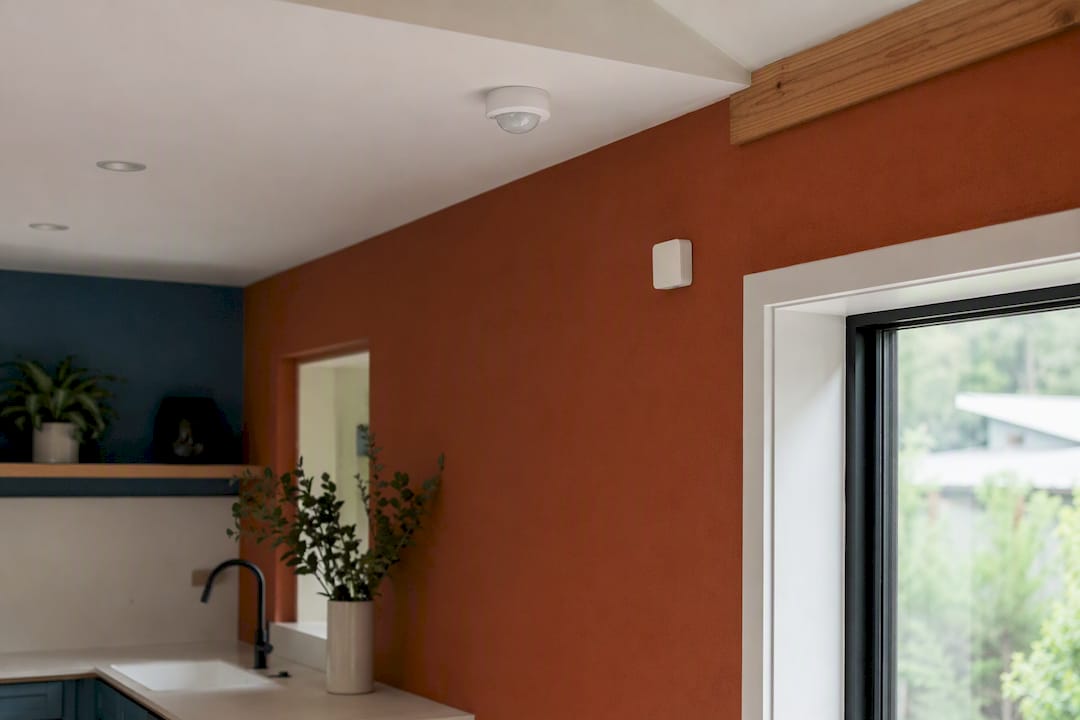
Occupancy sensing switches lights off automatically when a room empties, removing the human error of forgotten switches. Daylight harvesting dims artificial lighting in proportion to how much natural light is already coming through a window, so a desk near a south-facing window barely needs artificial lighting at midday. The ENERGY STAR findings back both mechanisms directly, and a pilot field study on open-plan offices found that occupancy sensors paired with personal dimming controls delivered savings of around 32% against conventional switched lighting.
Pro Tip: Pair occupancy sensors with a short “hold” delay of several minutes rather than the factory default of only a couple to avoid flicker and annoyance in rooms where people sit still. Shorter delays cause lights to flicker off mid-task in rooms where people sit still, like home offices or reading nooks, which annoys people more than it saves electricity.
Tunable white lighting brings a genuine wellbeing angle too. Shifting colour temperature from cool, blue-rich light in the morning to warmer tones in the evening supports a more natural circadian rhythm, which matters in offices where staff spend most daylight hours under artificial light, and in bedrooms where evening blue light disrupts sleep onset.
None of this comes free of trade-offs, though:
- Interoperability gaps: not every Zigbee bulb plays nicely with every hub, especially across brands
- Cloud dependency: some systems stop responding to schedules if the manufacturer’s servers go down
- Privacy considerations: occupancy data and usage patterns get logged somewhere, and that somewhere is worth checking
- Upgrade costs: adding sensors and tunable white fittings after the fact costs more than specifying them from the start
Do you need an electrician to install smart lighting?
The honest answer depends on what you’re touching. Swapping a bulb for a smart bulb needs nobody. Fitting a smart switch, adding a wired DALI-2 system, or rewiring a fuseboard to support new circuits needs a qualified electrician, and UK wiring regulations require it for most switch and circuit-level work.
-
Check for a neutral wire at the switch. Many older UK properties wired switch drops without a neutral conductor, which smart switches typically need to stay powered. An electrician tests for this before any switch swap, and its absence is the single most common reason DIY smart switch installs fail.
-
Assess fuseboard capacity. Adding a gateway, additional circuits, or a DALI-2 control bus sometimes means confirming the consumer unit has spare ways and adequate protection, particularly in older properties running close to capacity already.
-
Verify circuit labelling. A confused circuit map turns a straightforward retrofit into hours of trial and error, and it’s a common discovery on properties that have had informal rewiring over the years.
-
Plan zones before wiring anything. Deciding which lights group together as a “scene” or zone is far cheaper to change on paper than after cables are chased into plaster.
-
Get proper handover documentation. A certified installer should leave you with a certificate confirming the work meets current wiring regulations, plus a record of what’s on each circuit.
Costs vary widely depending on scope. A handful of smart bulbs might cost less than a single takeaway. A wired DALI-2 retrofit across a house or small office, involving an electrician’s day rate, new cabling, drivers, and commissioning time, runs into the thousands rather than the hundreds, scaling with the number of zones and whether walls need opening up. New-build projects come out cheaper per point than retrofits, because cabling goes in before the plaster does.
Pro Tip: Ask any electrician quoting for a lighting control job whether they’ll leave you a written zone and scene list at handover. Without it, the next person who touches your consumer unit is working blind.
How do you choose a compatible system?
Before committing to any smart lighting control system, run through this checklist with whoever’s supplying or installing it:
- Existing wiring: does the property have a neutral at the switch, and is a rewire realistically on the table?
- Hub requirement: does the system need a dedicated hub, or does it run hubless over Bluetooth Mesh or Wi-Fi?
- Ecosystem fit: does it work with the voice assistant or app ecosystem you already use at home or across the business?
- Commercial standards: for workplace projects, does the specification call for DALI-2 or IEC 62386 compliance, and are the fittings certified to it?
- Scene and scheduling flexibility: can non-technical staff adjust scenes themselves, or does every change need a callout?
Worth asking any installer directly: how is the system commissioned, what warranty covers the drivers and sensors, and can scenes be reprogrammed without specialist software down the line? Specifying DALI-2 and open protocols reduces the risk of getting locked into one manufacturer’s proprietary app for the next decade.
There’s a genuine trade-off between DIY ease and long-term scale. Wireless mesh and Wi-Fi systems win for speed and low upfront cost in homes. But for commercial premises expected to run for fifteen or twenty years, a wired, open-standard approach avoids the slow creep of app subscriptions, discontinued hubs, and cloud outages that plague purely wireless deployments. Hybrid setups that mix a wired backbone with wireless sensors for flexibility often give the best of both.
What’s the step-by-step for a smooth installation?
A rushed install is where most smart lighting projects go wrong, usually because nobody wrote down what they wanted before the electrician arrived.
- Inventory existing fittings and circuits. Note which switches have a neutral, which fittings are integrated LED, and which take standard bulbs.
- Define zones and a scene list on paper. Decide which lights group together before any device gets fitted, not after.
- Confirm wiring readiness. Check fuseboard capacity and neutral availability at each switch location that needs one.
- Isolate circuits before fitting devices. Basic electrical safety, non-negotiable, and mandatory if you’re not a qualified electrician doing the isolating yourself.
- Mount sensors with care. Occupancy sensors need a clear line of sight to where people actually sit or walk, not just a convenient ceiling void.
- Commission and test. Check dimming performance at low and high ends, response latency for occupancy triggers, and that every scene fires as programmed.
- Back up settings and hand over. Leave the client (or yourself, if it’s your own home) with exported configuration, a quick user guide, and a support contact for when something inevitably needs tweaking six months later.
Who’s behind this guide on smart lighting control?
Smarthometechnical are electrical contractors specialising in renewable energy installations, including solar panel installation, battery storage, and EV charger installation, alongside general electrical and home automation work.
- Direct experience wiring lighting control alongside solar and battery installations across residential and commercial sites
- Practical knowledge of how lighting control integrates into whole-home energy systems, rather than treating lighting as an isolated add-on
-.
-.
-.
Lighting control rarely sits in isolation. It touches the fuseboard, the energy monitoring setup, and increasingly the solar and battery system feeding the building, which is why an electrician who understands all three tends to spec a cleaner system than one who only knows lighting.
Key Takeaways
Smart lighting control saves measurable energy only when occupancy sensing and daylight harvesting are actually specified, not just app-based remote control.
| Point | Details |
|---|---|
| Sensors drive the savings | Occupancy sensors paired with personal controls cut lighting energy by around 32% in pilot office studies. |
| Match protocol to project | Use wireless mesh (Zigbee, Bluetooth Mesh) for fast retrofits; specify DALI-2 for long-life commercial installs. |
| Check the neutral wire first | Most UK smart switch installs fail because older switch drops lack a neutral conductor. |
| Plan zones before cabling | Decide scenes and groupings on paper before an electrician chases cables into walls. |
| Get professional wiring checked | Smarthometechnical installs both DIY-friendly and fully commissioned lighting control systems across Dorset, Hampshire, and Devon. |
Why the “smart bulb versus nothing” debate misses the point
The conventional pitch for smart lighting control fixates on convenience: dim your lights from your phone, ask a speaker to turn them off. That’s a real perk, but it’s not where the energy savings live, and treating it as the whole story leads people to buy a box of smart bulbs and stop there.
The evidence points somewhere less glamorous: occupancy sensors and daylight harvesting do the actual work, and they’re the features most DIY installs skip entirely because they need proper placement, not just a firmware update. A commercial pilot study returning 32% savings didn’t come from an app; it came from sensors doing their job without anyone touching a screen.
If you’re prioritising one thing, prioritise sensor placement and daylight linking over voice control gimmicks. For a workplace or a whole-house project, that also means taking the wired, standards-based route seriously rather than defaulting to whatever mesh of bulbs is cheapest this month. Consumer convenience and genuine energy performance are related but not the same goal, and conflating them is how good budgets get spent on the wrong layer of the system.
— Simon
Get smart lighting control installed properly, alongside your wider energy setup
Smarthometechnical is the practical route to smart lighting control that’s wired in correctly the first time, not bolted together from mismatched bulbs and hoped-for compatibility. As electrical contractors already working on fuseboards, solar arrays, and battery systems across Dorset, Hampshire, and Devon, fitting lighting control into that same visit means one qualified team checking neutrals, circuit capacity, and zoning, rather than a DIY kit and a separate callout when something doesn’t sync.

This matters most for anyone planning lighting control alongside a wider energy project, since a lighting circuit sharing a fuseboard with a new EV charger or battery storage system needs one coherent plan, not three separate contractors working from different assumptions. If you’re weighing up a combined solar and battery installation or planning a broader home automation upgrade, get in touch with Smarthometechnical for a site assessment and a quote that covers the wiring, the commissioning, and the handover properly.
Sources
For deeper technical detail, see ENERGY STAR’s smart lighting guidance, the DALI-2 standard overview, Wikipedia’s lighting control system entry, and Signify’s Interact wireless system for commercial wireless deployment detail.
