
Voice control works best when it sits on top of a well-planned home, not when it is bolted on afterwards. A voice assistant is only the front door: the lights, heating, sockets and security behind it need sound wiring, a stable network and sensible naming, or “turn on the lounge lights” becomes a daily lottery. If you live in Dorset, Hampshire or Devon and want voice control that behaves, the sensible route is to plan it with an electrician who installs home automation controls as part of the electrical work, so the voice layer has a solid foundation.
This guide explains how voice control actually works, which assistants and devices pair up in the UK, how to set up voice-controlled lighting, and what to check on privacy and reliability.
TL;DR
- Voice control is a chain: a microphone hears a wake phrase, software interprets the request, and the system sends a command to a device or a scene.
- Lighting is the best place to start: it is the most commonly requested voice command and the easiest to test room by room.
- Clear device names, one room per light and simple on/off testing before dimming and colours save most of the frustration.
- Change default passwords, switch on two-factor authentication and keep updates on, as GOV.UK advises.
- Wiring, neutral conductors, network coverage and the consumer unit are decisions made before any speaker is plugged in, which is why planning with an electrician pays off.
Table of Contents
- How voice control works in a smart home
- Which assistants and devices work together in the UK
- Setting up voice-controlled lighting
- Beyond lighting: what else responds to your voice
- Privacy, security and reliability
- Why plan voice control with an electrician
- Our approach to home automation
- Talk to us about voice control for your home
- FAQ
- Sources
How voice control works in a smart home
The Home Technology Association describes voice control as a chain of steps: a microphone hears a wake phrase, software works out what you asked, and the system sends an action to connected devices or to a programmed scene. Each link can fail on its own, which is why a house can have a perfectly good speaker and still ignore you.
In plain terms, there are four parts:
- The listener. A smart speaker, display, phone or wall panel with a microphone. It only starts processing after the wake phrase.
- The interpreter. Software, usually in the cloud, that turns your speech into a command. Some systems can do this locally in the home.
- The hub or platform. The place where your devices are registered, grouped into rooms and linked into scenes.
- The devices. Lights, plugs, switches, heating controls, blinds, locks and sensors that carry out the command.
A scene is a saved set of actions under one name. “Evening” might dim the living-room lights, switch on a lamp and close the blinds. Saying one word instead of four commands is where voice control starts to feel useful rather than gimmicky.
Cloud or local: why it matters
Some systems send your voice to a remote server for interpretation; others process commands inside your home. The difference affects speed, privacy and what still works when the broadband drops. If you want the underlying trade-offs explained for a similar kind of system, this piece on cloud versus local processing covers how data handling and local operation compare.
Home Assistant, a popular open smart-home platform, shows both approaches. Its official documentation says the built-in conversation agent runs locally and understands commands such as turning on the kitchen lights, along with sentences you define yourself. It also says speech-to-text and text-to-speech can come from integrations that run locally or in the cloud. Most households will not want to run their own server, but it is useful to know the choice exists.
Which assistants and devices work together in the UK
Compatibility is the part that catches people out. Before buying anything, check which assistants a product supports and whether it needs its own app, hub or account.
Two manufacturer pages show how it typically looks:
- Philips Hue UK lists Amazon Alexa, Apple Home and Siri, Google Assistant and Sonos Voice Control as voice options for its lights. The same page lists IFTTT and Samsung SmartThings among integrations for wider automation.
- Samsung UK says SmartThings works with certified Google Assistant devices to control lighting, plugs and SmartThings scenes, and to check the status of motion and contact sensors. The page was updated in March 2022, so check your own app version for current steps.
The lesson is to pick one main assistant for the household first, then choose devices that support it, rather than collecting devices and hoping they agree. If family members use different phones, favour products that list several assistants, so everyone can speak to the house in their own way.
Hard-wired or plug-in?
Smart bulbs are simple: screw them in, pair them, done. But a bulb is controlled by software, so anyone who flicks the wall switch off leaves the bulb unreachable by voice. Smart switches and dimmers that replace the wall plate avoid this, because the light stays powered and the switch itself becomes controllable. Fitting them involves mains wiring, and some need a neutral conductor at the switch position that older UK homes do not always have. This is electrical work, and it is where an electrician earns their place in a voice-control project.
Setting up voice-controlled lighting
Lighting is the most popular first step. The exact steps depend on the product, but a lighting guide from a UK retailer lays out the general order: install and power the light, pair it in its own app or network, link it to your assistant, and confirm it appears in the assistant’s device list. The UK Government’s guidance adds that some smart devices need the internet, an app or an account, and that the manufacturer’s manual, support site or app is the place for product-specific instructions.
Here is the routine, with where it tends to go wrong:
- Check the wiring and power first. Confirm the fitting, switch and circuit suit the product. Mixing dimmable smart bulbs with an old dimmer switch is a classic cause of flicker and buzzing. Anything beyond changing a bulb sits with a qualified electrician.
- Pair the device in its own app. Do this before touching the assistant. If it will not pair here, it will not pair anywhere.
- Name each light clearly. Use the room and the fitting, such as “kitchen spotlights” or “hall pendant”. The Simple Lighting guide advises giving each light a clear name and room. Avoid names that sound alike: two lights called “lamp” and “lamb” will cause arguments.
- Link the app to your assistant. Use the assistant’s own app to add the service, sign in and let it discover the devices.
- Test on and off first. Only once that works reliably should you try dimming levels, colour changes and groups.
- Build groups and scenes. Group by room (“downstairs”), then add scenes such as “evening” or “leaving home”.
Routines you can trigger by voice
Routines chain several actions together. Amazon’s UK announcement of Alexa+, dated 19 March 2026, says UK customers can create custom routines by voice, combining actions such as changing the lights, playing music and sharing a weather forecast. A good household routine is short and predictable. “Goodnight” might switch off the downstairs lights, dim the landing and turn on a bedside lamp. Start with one or two routines you will really use, and add more only once those feel natural.
Worked example: a three-bedroom house
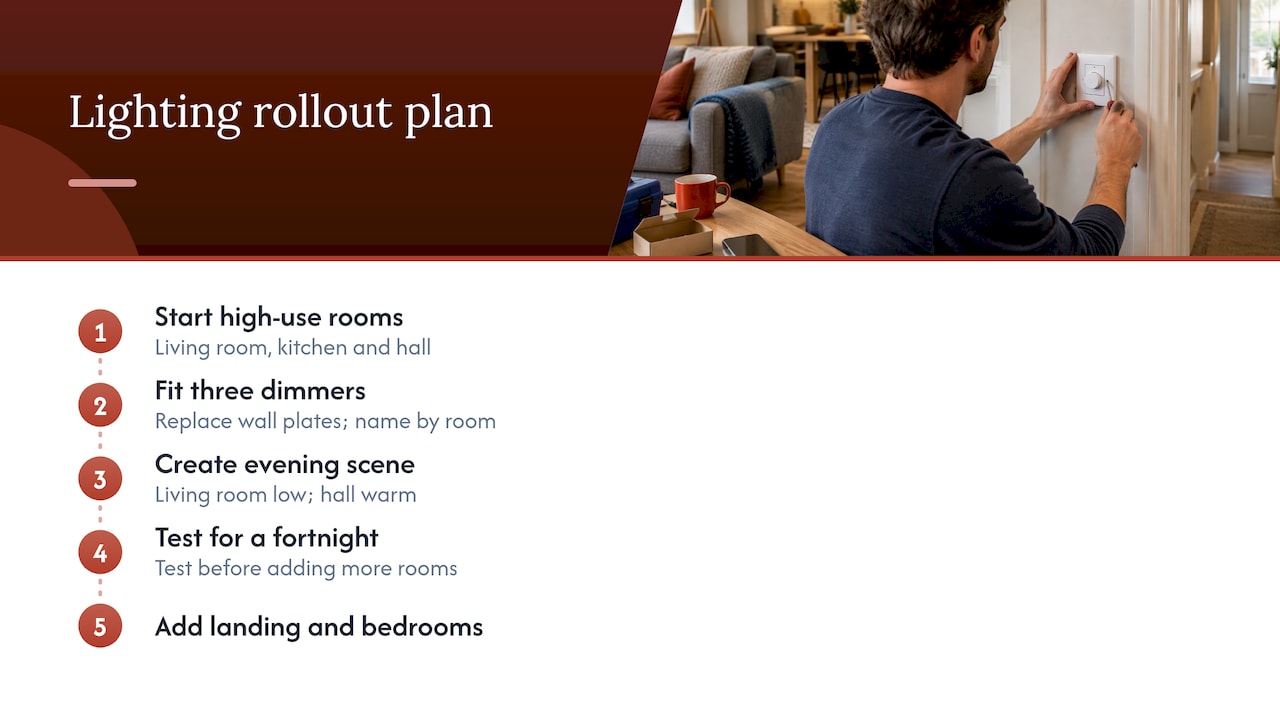
Imagine a family home in Poole with eleven lighting circuits. A sensible plan is to start with the living room, kitchen and hall, where the lights are used most. Three smart dimmers replace the wall plates, each named for its room. A scene called “evening” sets the living room to a low level and the hall to a warm setting. After a fortnight of testing, the family adds the landing and bedrooms. Because the wiring was checked at the start, nothing needs to be redone later. The whole project grows in stages, and each stage is tested before the next one begins.
Beyond lighting: what else responds to your voice
Once lighting is reliable, other systems can join the same platform:
- Heating and hot water. Voice-adjustable thermostats and scheduled hot water are natural next steps. Our guide to smart hot water control explains how it works and what you need.
- Security and cameras. Voice can arm or check some systems, though disarming doors and alarms by voice deserves extra caution (see below).
- Energy. Homes with solar panels, batteries or an EV charger can bring those into the same picture. Our explainers on smart home energy management and whole home energy systems show how the pieces connect.
The more systems you connect, the more it matters that they were specified together. A single plan for lighting, heating, security and energy is far easier to live with than five apps installed over five years.
Privacy, security and reliability
A microphone in the living room and a link to your front door deserve a little care. The UK Government’s smart device guidance is short and practical:
- Change any easily guessed default passwords.
- Turn on two-factor authentication wherever the device or service offers it.
- Enable automatic updates when available, and install manual updates promptly.
- Check product and manufacturer reviews before you buy.
On data, the Department for Digital, Culture, Media and Sport’s Code of Practice for Consumer IoT Security says manufacturers and providers should make clear how personal data is used, by whom and for what purposes. Read that information in the app’s privacy settings, and review voice history and sharing options when you set the assistant up.
Sensible rules for doors and alarms
- Use voice for convenience actions such as lights and music first.
- If you link a lock or alarm, require a PIN or a confirmation step for anything that opens or disarms.
- Keep guest and child profiles separate where the platform allows it.
When the broadband drops
Devon and Dorset have plenty of rural properties where broadband is patchy. The same government code says devices and services should, as far as reasonably possible, remain locally functional during network loss and recover cleanly after power is restored. In practice, that means wall switches should keep working as ordinary switches, and the key functions of the house should never depend on a cloud connection alone. When you plan the system, ask what happens to each function during an outage and after a power cut.
Why plan voice control with an electrician
Most voice-control disappointments are not caused by the assistant. They come from the layers beneath it:
- Wiring and switches. Smart dimmers, neutrals, LED compatibility and circuit loading are electrical questions.
- Network coverage. A device at the far end of a stone-walled cottage or a long bungalow needs a signal strong enough to stay online.
- Consistency. Using one platform across lighting, heating and security avoids a drawer of incompatible hubs.
- Future energy plans. If solar, a battery or an EV charger is on your horizon, cabling and consumer unit capacity can be planned once, rather than reopened later.
- Safe installation. Mains work should be done and tested by a competent electrician.
That last point is where doing it in one planned project beats piecemeal buying. We are an electrical contractor, so lighting controls, EV chargers, solar installations, CCTV, fire alarms and electrical testing can all be specified together.
Our approach to home automation
Smart Home Technical Ltd is an electrical contractor serving Dorset, Hampshire and Devon, with MCS and NICEIC accreditation and a 4.9 Trustpilot rating. Home automation controls are one of the services we install alongside general electrical work, solar PV and battery storage, EV chargers, CCTV and security, and fire alarms.
Voice control is the part everyone sees, but it is the least interesting part of the job. What makes it feel effortless is a tidy installation: switches that still work as switches, circuits that are properly tested, and a plan that does not fall apart when you add a battery or a charger next year.
Our advice is to decide what you want to say, then work backwards. If you want “goodnight” to turn off the house, we need to know which circuits, which controls and which platform. It is far cheaper to decide that before the first wall plate comes off than after.
We like to keep the household in charge. That means clear names, simple scenes and manual control that always works, so a guest, a child or a power cut never leaves anyone standing in the dark.
Simon
Talk to us about voice control for your home
If you are planning smart lighting, heating or security controls in Dorset, Hampshire or Devon, our home automation service covers the installation side, so the voice layer you choose has a proper electrical foundation. We also install solar, batteries and EV chargers, so everything can be planned as one system.
You can see the full range of what we do on our main site.
FAQ
How do I set up voice control for my lights?
Power the light, pair it in the manufacturer’s app, then link that app to your voice assistant and confirm the light appears in the assistant’s device list. Give each light a clear name and room, and test simple on and off commands before dimming or colours. If the light is hard-wired, such as a smart dimmer replacing a wall plate, have a qualified electrician fit it.
Can I use voice control with Home Assistant?
Yes. Home Assistant’s Assist feature has a built-in conversation agent that runs locally and understands commands like turning on the kitchen lights, plus sentences you create yourself. Speech-to-text and text-to-speech can run locally or through the cloud. It suits people who enjoy configuring their own system.
Does voice control still work without internet?
That depends on the products and how the system is set up. Some smart devices work without internet and others need an app or account, as GOV.UK explains. A well-planned installation keeps wall switches working as normal switches, so lights never depend on the cloud alone.
Is voice control safe for doors and alarms?
It can be, with care. Use strong, unique passwords, switch on two-factor authentication, and keep software updated. For locks and alarms, ask for a PIN or confirmation before anything opens or disarms.
Sources
- Voice Control in the Smart / Connected Home, Home Technology Association
- Assist: Talk to your smart home with Home Assistant
- Works with Philips Hue, Philips Hue UK
- How to connect and use SmartThings with Google Home, Samsung UK
- Voice-Controlled Lighting: A Smart Home Setup Guide, Simple Lighting
- Introducing Alexa+ in the UK, Amazon UK
- Smart devices: using them safely in your home, GOV.UK
- Code of Practice for Consumer IoT Security, DCMS
- Cloud versus local processing explained
